

















United States passport photo requirements — official size, background, and pose guide

United States Passport Photo Requirements — Complete Guide

Review the official United States photo requirements — precise sizes, background, and pose rules. 100% free and private; everything runs in your browser.

51×51 mmMake United States Passport Photo NowCorrect size set automaticallyUpload Photo

Key Takeaways

The rules that decide the application.

  1. The print must be square — exactly 2 × 2 inches — with the head measuring 25 mm to 35 mm from chin to crown.
  2. Glasses are rejected outright in US passport photos, even on medical grounds, since the rule changed on 1 November 2016.
  3. One square file covers four applications: the passport book, the visa interview, the DV lottery upload and the green card.
  4. An adult book costs $130 plus a $35 execution fee for $165 total, with expedited service adding another $60.
  5. Prepare the file in PicToPassport and keep DS-160 uploads under 240 KB at 600 × 600 to 1200 × 1200 px, then print two copies as backup.

Official Requirements

The figures on file with the department that issues the passport.

Spec & Compliance Table

Spec & Compliance Table — United States
Photo size (passport)2 × 2 inch (51 mm × 51 mm), square — rectangular photos rejected
Head height / face sizeHead height 25 mm – 35 mm, bottom of chin to top of head
Resolution & filePrint at 300 dpi = 600 × 600 px; DS-160 upload JPEG under 240 KB, 600 × 600 – 1200 × 1200 px
BackgroundWhite or off-white — not pure white #FFFFFF
Photos required2 photos required
Photo age limitTaken within the last 6 months
Passport fee$130 passport book plus $35 execution fee — $165 in total
Standard processingNo verified figure — see State Department expedited processing for current times

Official source: U.S. State Department — passport photo requirements — Requirements change — re-check the current rules on the official page before you submit.

Fees & Processing Times

What it costs, and how long it takes.

Fees & Processing Times — United States
Adult passport book$130
Execution (acceptance) fee$35 — $165 total for an adult book
Passport card$30
Book and card together$160 plus the $35 execution fee
Expedited service+$60
1–3 day delivery+$22.05

Official fee schedule: U.S. State Department — passport fees

Fees and processing times are set by the issuing authority and change without notice. Confirm the current figure on the official page linked above before you pay.

US passport photo requirements are among the most specific in the world — the 2 × 2 inch square format, strict head size rules, and no-glasses policy mean getting it right requires attention to detail. This guide covers everything you need to know and shows how PicToPassport helps you create a compliant photo for free.

What Rejects a US Passport Photo

Photo rejection means delays to your passport, visa, or green card application. The US State Department enforces their rules strictly — wrong dimensions, wearing glasses, or a non-compliant background will all result in rejection. Getting the details right the first time saves you from extra trips and waiting.

Photo Size: The 2 × 2 Inch Square

The US passport, visa, DV lottery, and green card photo size is 51 mm × 51 mm (2 inches × 2 inches) — a square format unique to the United States. This is different from the rectangular 35 × 45 mm format used by most countries. The head must measure 25–35 mm from bottom of chin to top of head (1–1.375 inches). Make sure your photo is exactly square — rectangular photos will be rejected. Always verify with the official US Department of State before submitting.

Upload portals measure the file in kilobytes, and an oversized image is rejected outright: Compress Image to KB
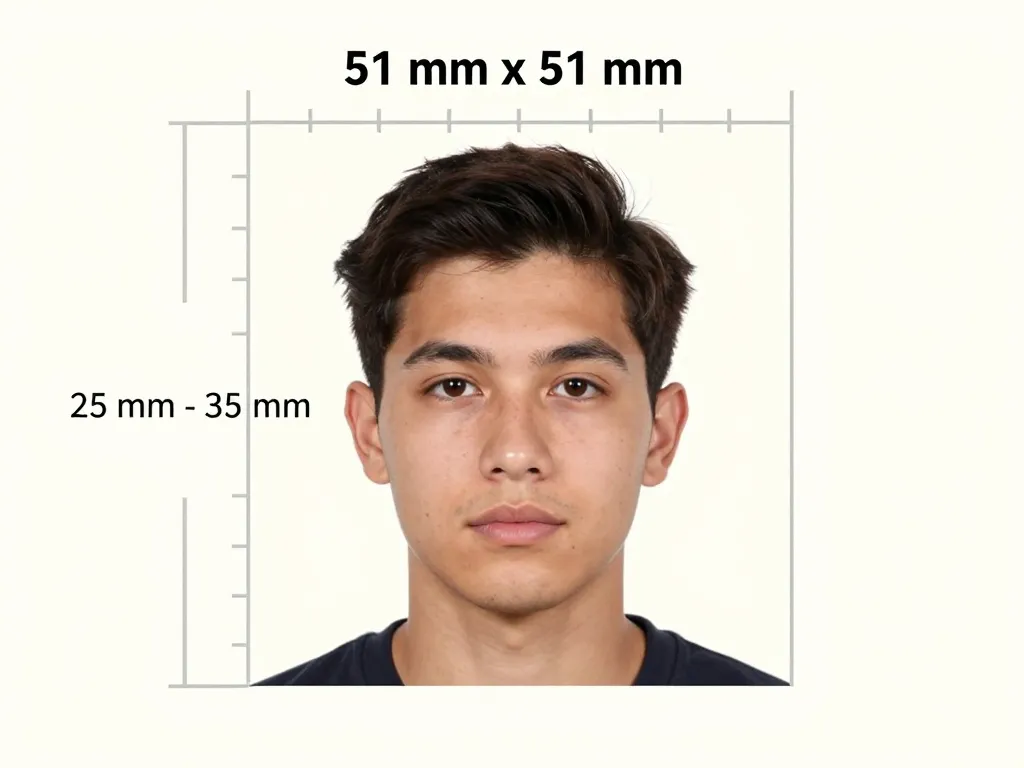
Measurement diagram of a 51 × 51 mm square print with a portrait inside a ruler frame and a bracket on the left marking a head measurement of 25 to 35 mm.

Background Color: Off-White, Not Pure White

A white or off-white background is required. Avoid pure white (#FFFFFF) as it may appear too bright. The background must be free of patterns, shadows, and objects. Lighting should be even across the face, with no harsh shadows behind the head. Stand 2–4 feet from a plain white or off-white wall for best results. Natural daylight or even indoor lighting works well.
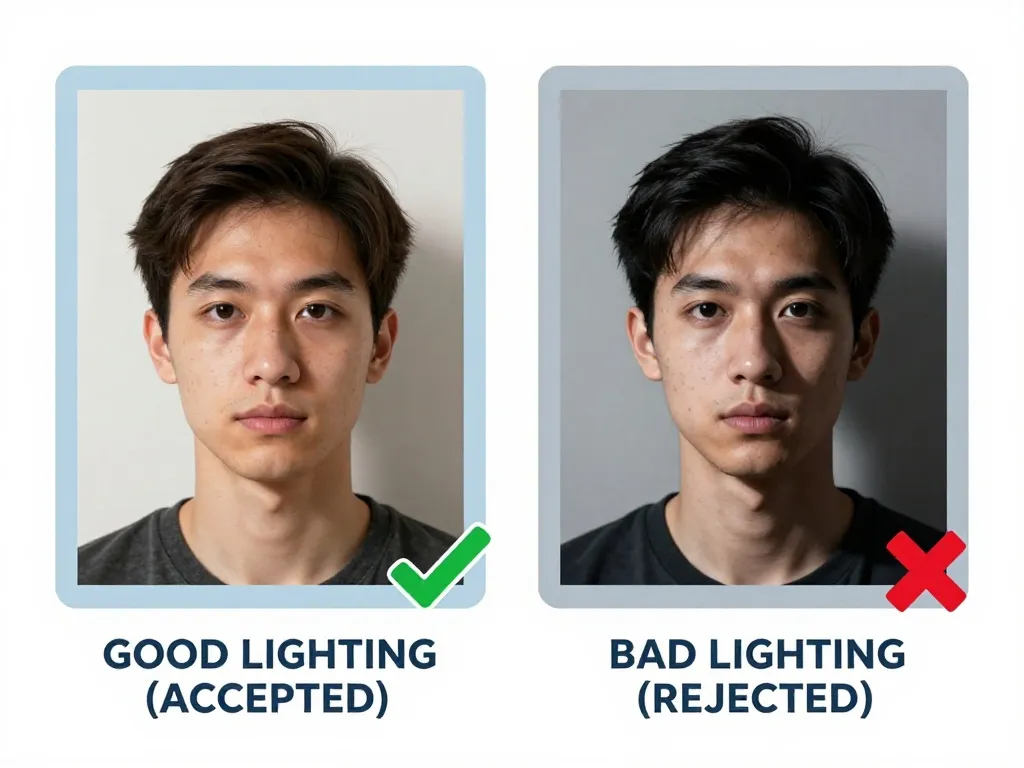
Two portraits side by side. The left, captioned Good lighting (accepted) and marked with a green tick, is evenly lit against a light background. The right, captioned Bad lighting (rejected) and marked with a red cross, is lit hard from one side, leaving a deep shadow across half the face.

Neutral Expression, Closed Mouth

US rules are strictest on the eyes: no glasses at all since 1 November 2016, and the medical exemption no longer exists. Beyond that, keep a neutral expression with the mouth closed, head level, eyes open and looking straight ahead. Head coverings are accepted for religious reasons only, and tribal or national costumes are refused. Contacts are permitted because nothing sits over the eye, and the square frame must show a face that reads instantly at arm's length.
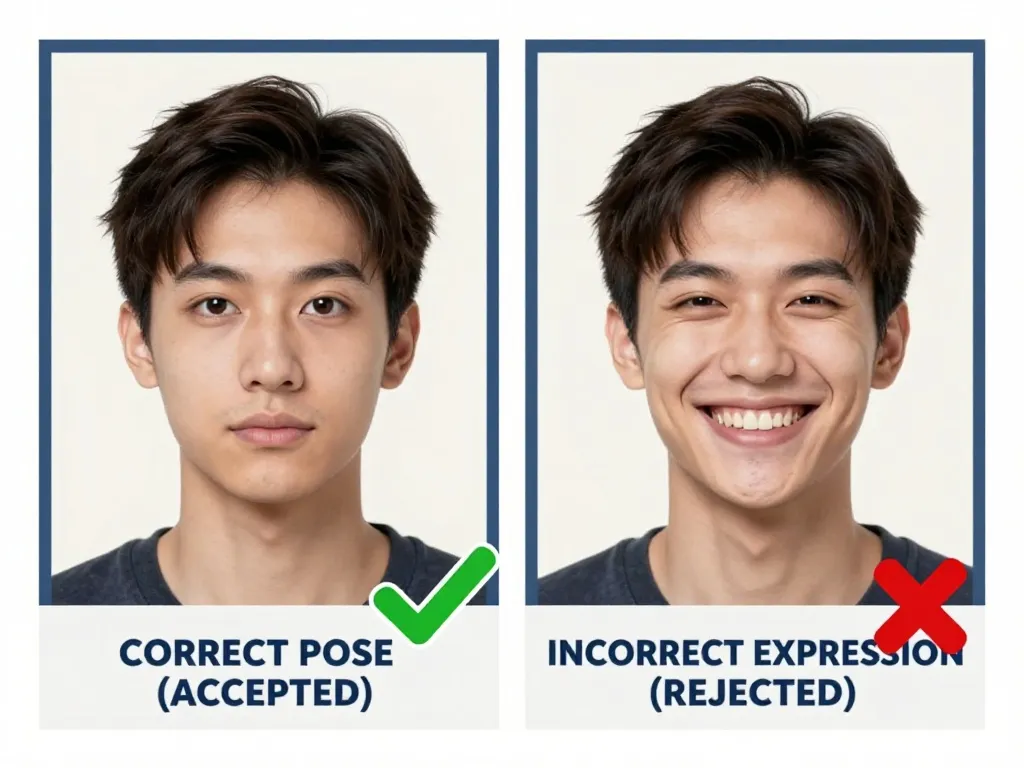
Two portraits side by side. The left, captioned Correct pose (accepted) and marked with a green tick, shows a closed mouth and a level gaze. The right, captioned Incorrect expression (rejected) and marked with a red cross, shows a wide toothy smile.

Glasses: The 2016 Federal Ban

No glasses are allowed in US passport photos — this has been the rule since November 1, 2016. Even medical exemption certificates are no longer accepted. This includes prescription glasses, sunglasses, and reading glasses. Head coverings are permitted for religious reasons only. Tribal or national costumes are not allowed.
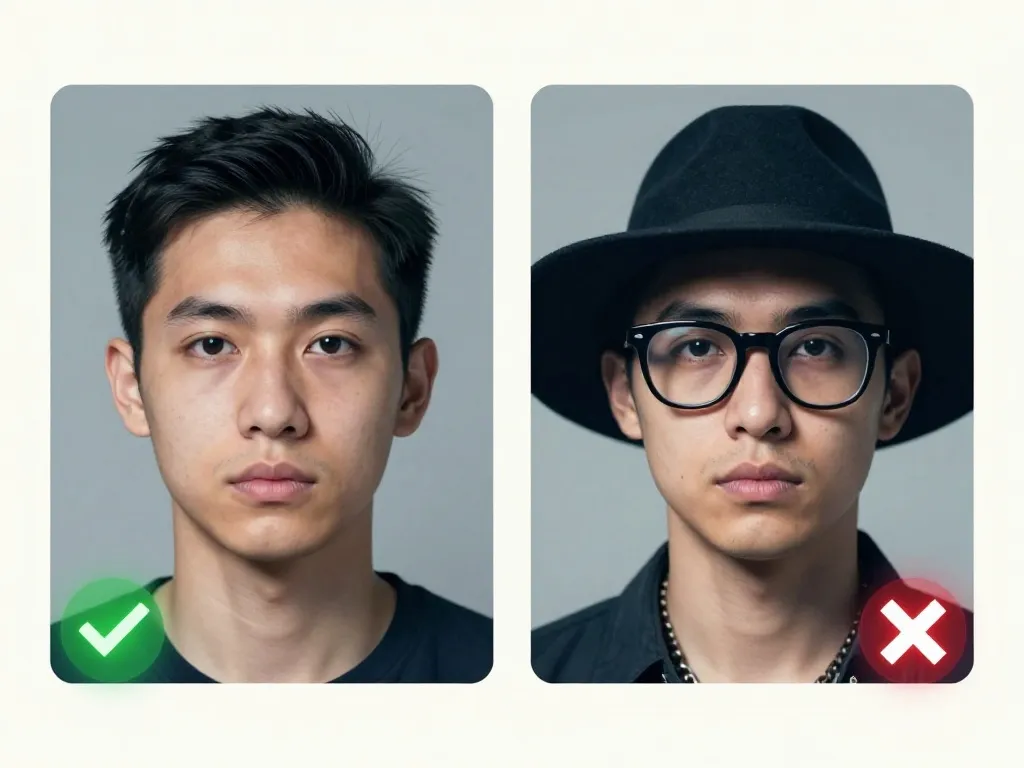
Two portraits side by side with no captions. The left, marked with a green tick, shows a man with no glasses and no hat. The right, marked with a red cross, shows the same man wearing thick black glasses and a black wide-brimmed hat.

Face Height and Chin-to-Crown Position

American officers measure 25 mm to 35 mm from the bottom of the chin to the top of the head, inside a square 51 mm × 51 mm print — 2 × 2 inches exactly. Rectangular photos are rejected on sight, so a 35 mm × 45 mm European print will not fit. Keep the face centred with even space at the sides, no shadow on the face or background, and use white or off-white rather than a bleached #FFFFFF that flattens the image.
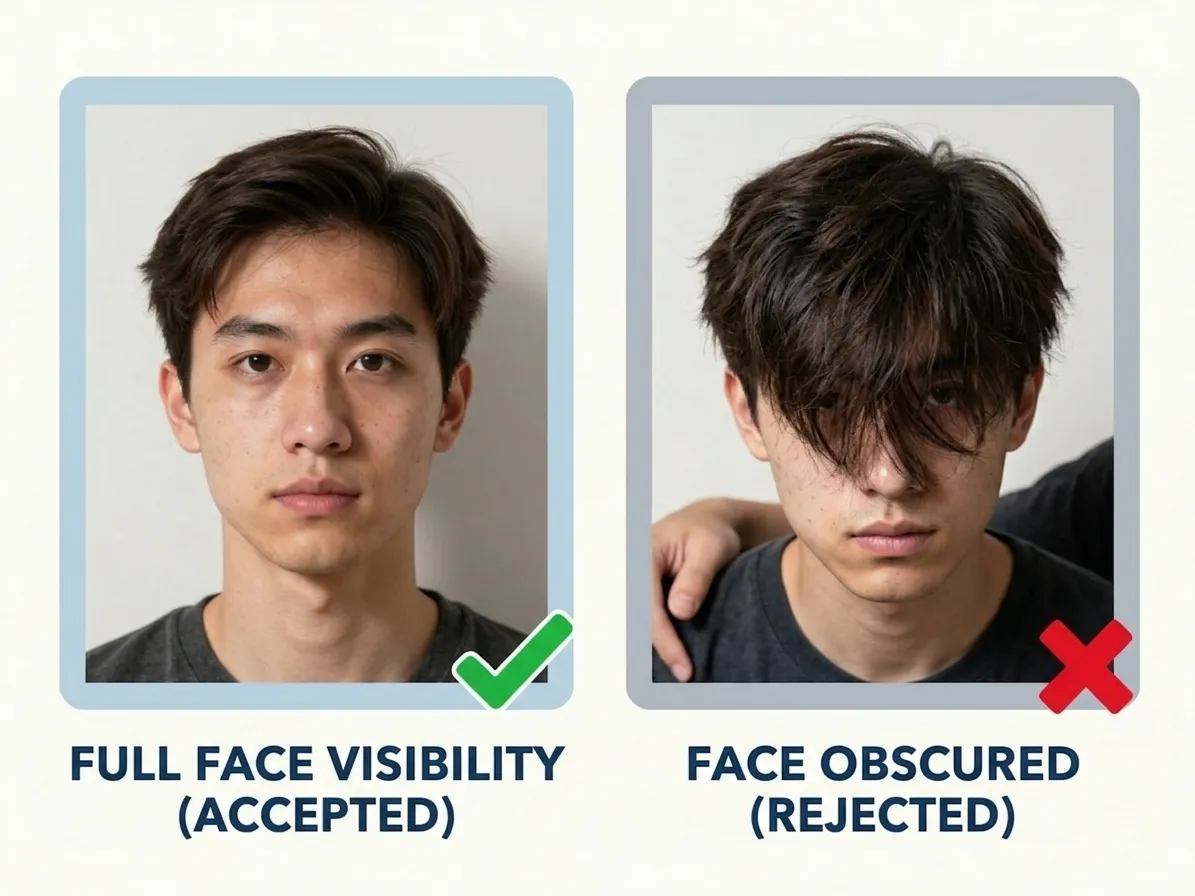
Two portraits side by side. The left, captioned Full face visibility (accepted) and marked with a green tick, shows a face with both edges clear. The right, captioned Face obscured (rejected) and marked with a red cross, shows hair falling across one eye and another person's hand on the shoulder.

Photo Age: The Six-Month Limit

Every American application shares one six-month rule: the passport book filed at an acceptance facility, the visa interview and the DV lottery upload all ask for an image taken within the last 6 months. The portals check the upload date and an officer checks by eye, so an older photograph costs you a wasted appointment. Retake before you book, then reuse the same digital file across the visa, lottery and green-card checks.
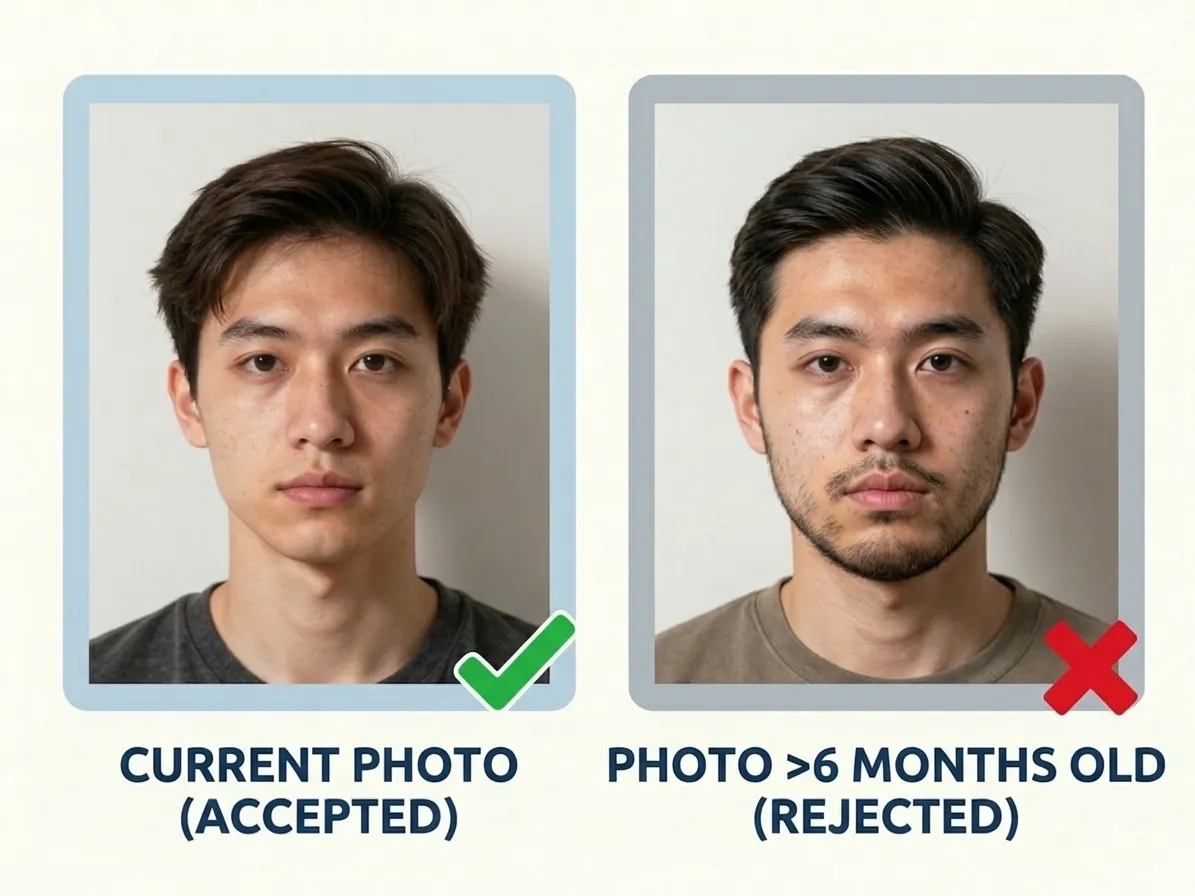
Two portraits side by side. The left, marked with a green tick and captioned as recent, shows a clean-shaven man. The right, marked with a red cross and captioned as more than 6 months old, shows the same man with a beard.

How Many Copies You Submit

US passport applications require 2 photos. When you use PicToPassport, you receive a digital file sized exactly for the 2 × 2 inch (51 × 51 mm) format plus a print-friendly layout with multiple copies on a single page. The digital file can be uploaded directly or taken to a photo shop for professional printing. You can also use it for visa, DV lottery, and green card applications.
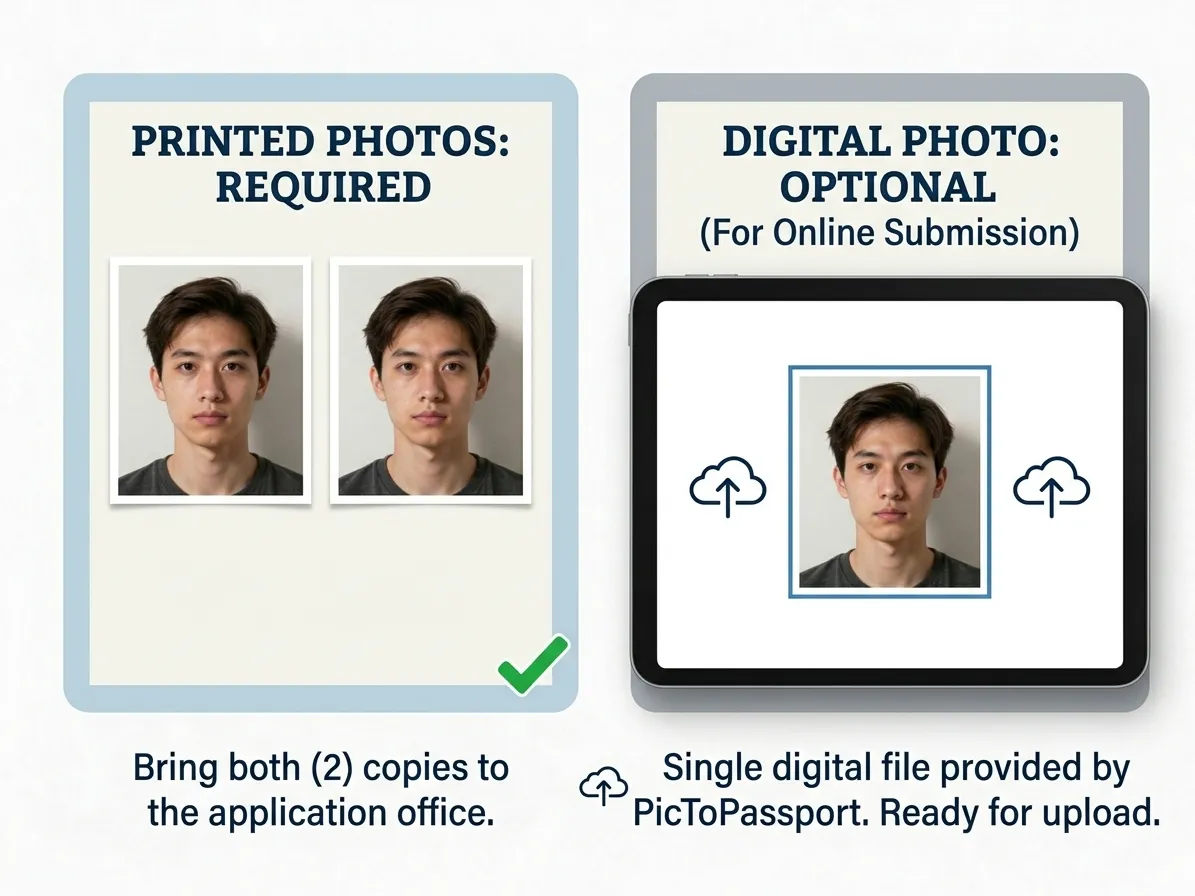
Two panels. The left, captioned Printed: required, shows two identical prints with a green tick, noted as copies to bring to the application office. The right, captioned Digital: optional, shows a tablet displaying the cropped portrait between two upload arrows, for online submission.

Rejections and Common Mistakes

The most frequent reasons for rejection are using rectangular photos instead of square 2 × 2 inch, wearing glasses, and non-white backgrounds. Other issues include head tilting, smiling, photos older than six months, and shadows on the face or background. Always check the US passport photo requirements before submitting.

Passport rules and green card rules are not the same, so a visa photo is judged differently: DV Lottery Photo Checker
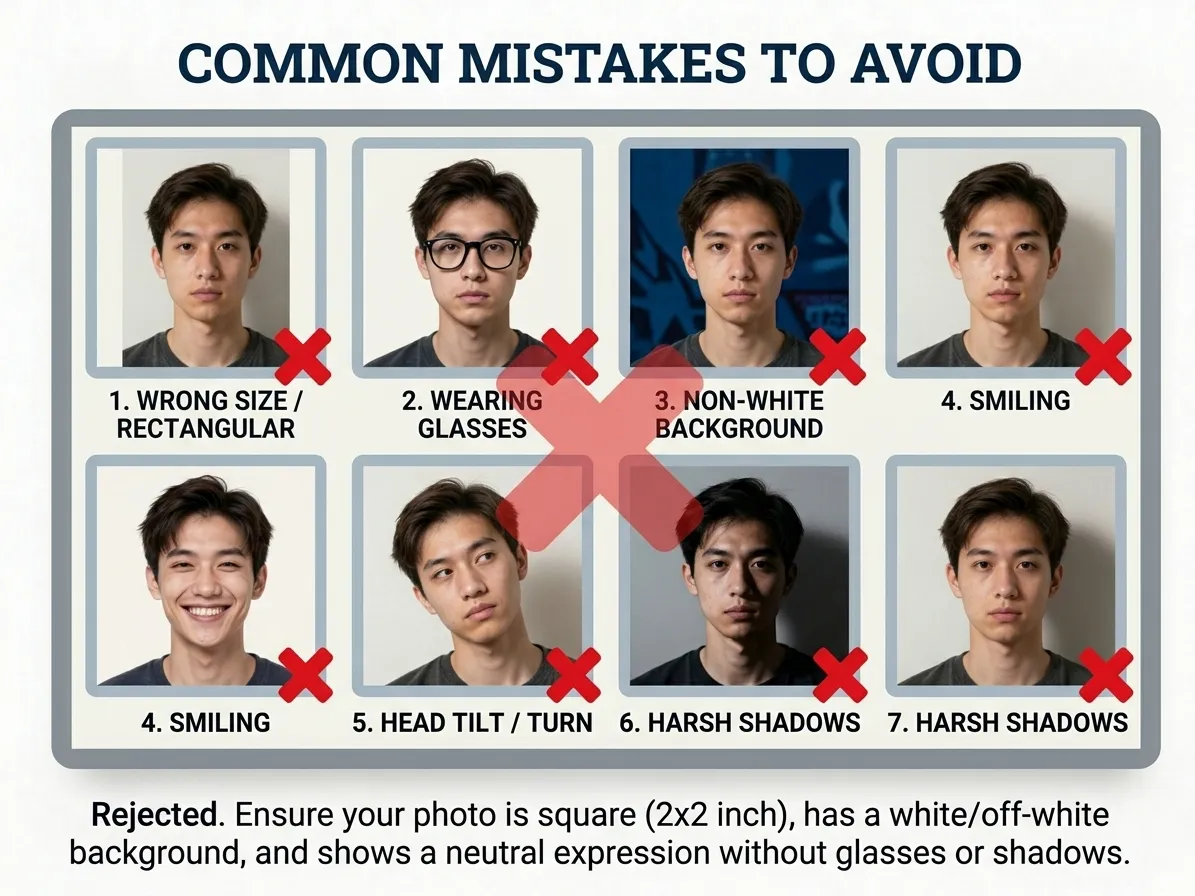
A grid headed Common mistakes to avoid showing eight portraits, each marked with a red cross and labelled wrong size or rectangular, wearing glasses, non-white background, smiling, head tilt or turn, and harsh shadows.

Baby and Child Photos

The United States is the rare authority that lets a baby's eyes stay closed — there is no need to wake or coax an infant into an open-eyed stare, as long as the baby faces forward. Everything else holds: the square 2 × 2 inch frame, white or off-white background, head measuring 25 mm to 35 mm, and no cropping of the crown. Lay the baby on a white sheet, shoot from above, and support the head from outside the frame.

Framing an infant is where most adults go wrong, and this one measures the head for you: Baby Passport Photo Maker
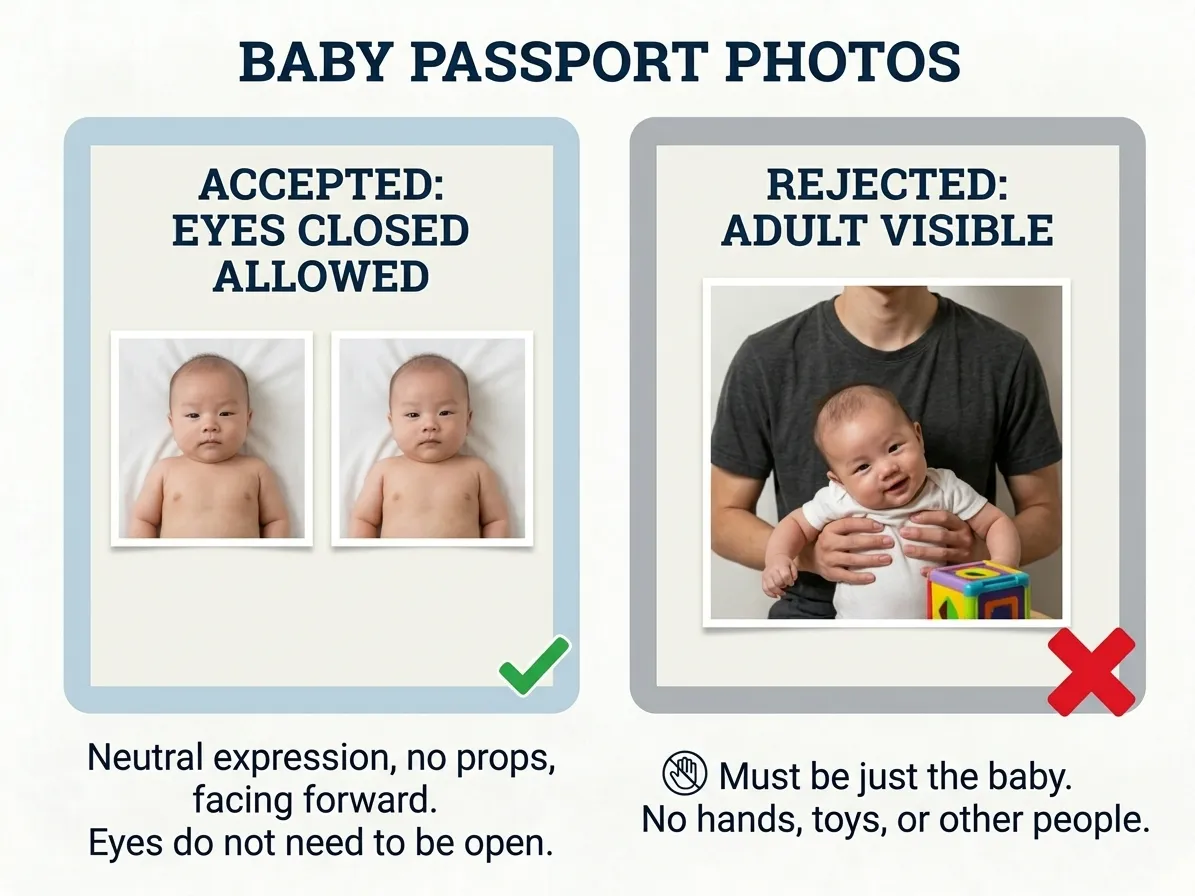
Two panels. The left, marked with a green tick, is captioned Accepted: eyes closed allowed and shows two small prints of a baby lying on a white sheet. The right, marked with a red cross, is captioned Rejected: adult visible and shows an adult holding a baby beside a toy.

Checking the Crop With PicToPassport

A US photo is square: 2 × 2 inch, or 51 mm × 51 mm, with head height 25 mm – 35 mm. PicToPassport crops to that square free in your browser and sets a white or off-white background — never pure white — while you hold a neutral expression with no glasses. Output covers both uses: print at 300 dpi as 600 × 600 px for the 2 photos required, or export a JPEG under 240 KB for upload. Nothing leaves your device.
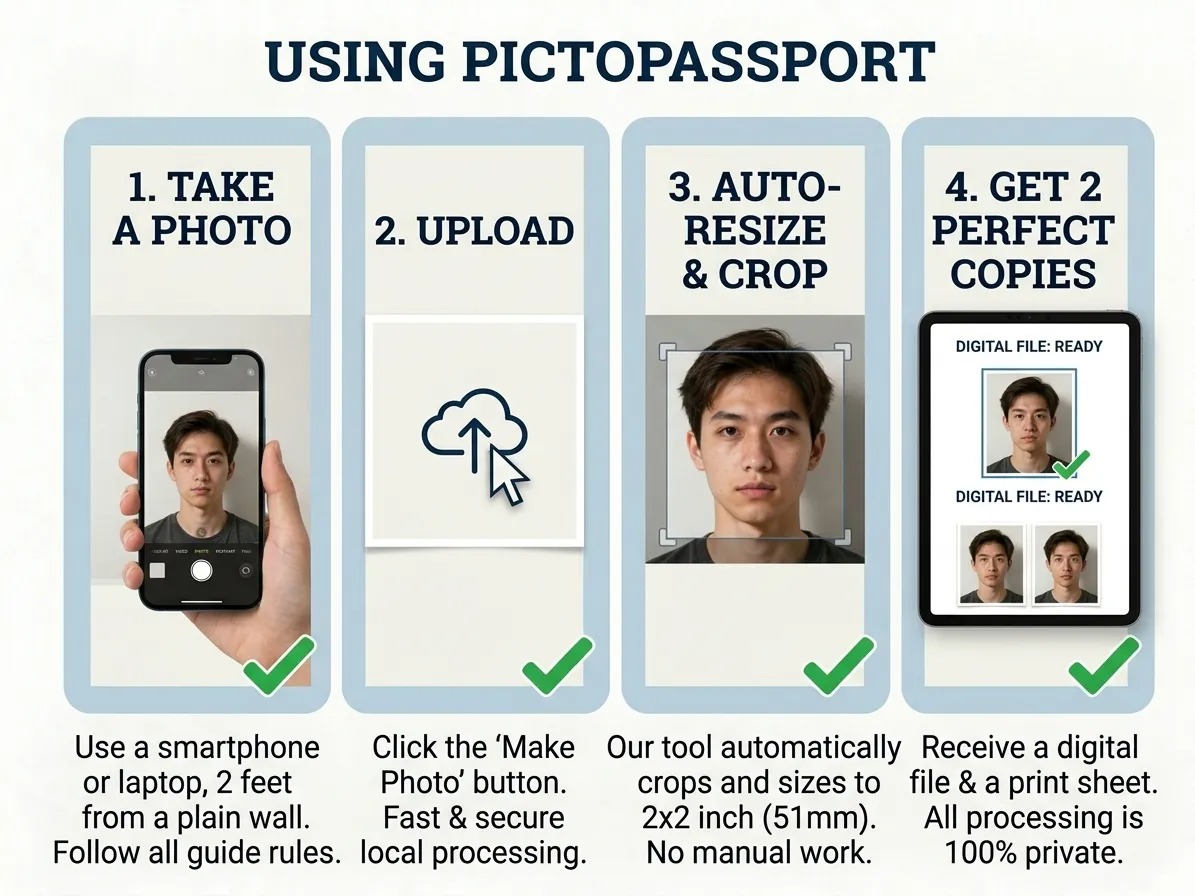
Four numbered panels, each marked with a green tick, showing the sequence: capture with a phone, upload the file, auto-resize and crop to a crop frame, and receive a digital file shown beside two prints.

Make the Photo, Skip the Booth

The U.S. State Department charges $130 for a passport book plus a $35 execution fee — $165 in total — and publishes no verified processing figure, so its expedited page holds the current times. Your photo needs no appointment: PicToPassport squares the frame to 2 × 2 inch, keeps the white or off-white background, and runs free and private in your browser with nothing leaving your device.


Frequently Asked Questions

What size is an American passport photo?

US passport photos are exactly 2 × 2 inches square (51 × 51mm) — 600 × 600 pixels at 300 dpi — with the head measuring 25–35mm from chin to top of head. Ask any US photo counter for the 2-inch passport size and you get the right cut.

How many photos should I bring to a US passport appointment?

Most applications need 2 photos — bringing 2 keeps you covered.

What backdrop works for a US passport photo?

White or off-white. Avoid pure white (#FFFFFF), which can come out too bright.

Are glasses allowed in a US passport photo?

No. Since November 1, 2016, the US State Department no longer accepts passport photos with glasses, even for medical reasons.

My US passport photo is seven months old. Will it still be accepted?

Probably not. There is no grace period, and at an acceptance facility the date is judged by eye rather than checked against a database. Retaking costs a few minutes in a day; a second appointment costs weeks, so re-shoot before you book rather than after.

What is the US rule on head coverings?

Coverings are allowed only for religious reasons. Tribal or national costumes do not qualify.

Do babies need their eyes open in US passport photos?

No — babies' eyes do NOT need to be open for US passport photos, which is a unique exception. However, the baby must be facing forward.

Can I use a selfie for my US passport photo?

Yes, but the photo must meet strict requirements: white background, neutral expression, no glasses, correct dimensions, and proper lighting. Use a timer or have someone take it.

Why does my DS-160 photo upload fail?

The top causes are file over 240KB, HEIC instead of JPEG (iPhone default — convert to JPEG first), or a non-square image. DS-160 needs JPEG, 600x600–1200x1200px, square, under 240KB. Compress and retry; bring a printed 2x2 backup to the interview.

What are the DV lottery photo requirements?

DV lottery needs exactly 600x600px JPEG under 240KB, taken within 6 months, white background, no glasses, no AI edits. The portal auto-rejects any violation — the entry fails to submit.

How much does a US passport photo cost at CVS or Walgreens?

CVS and Walgreens charge $16.99 for 2 prints (no refund if rejected). PicToPassport makes the same 2x2 compliant photo free in your browser — no upload, private — then print for ~$1 at any kiosk.

100% Private — Your photos never leave your device
