

















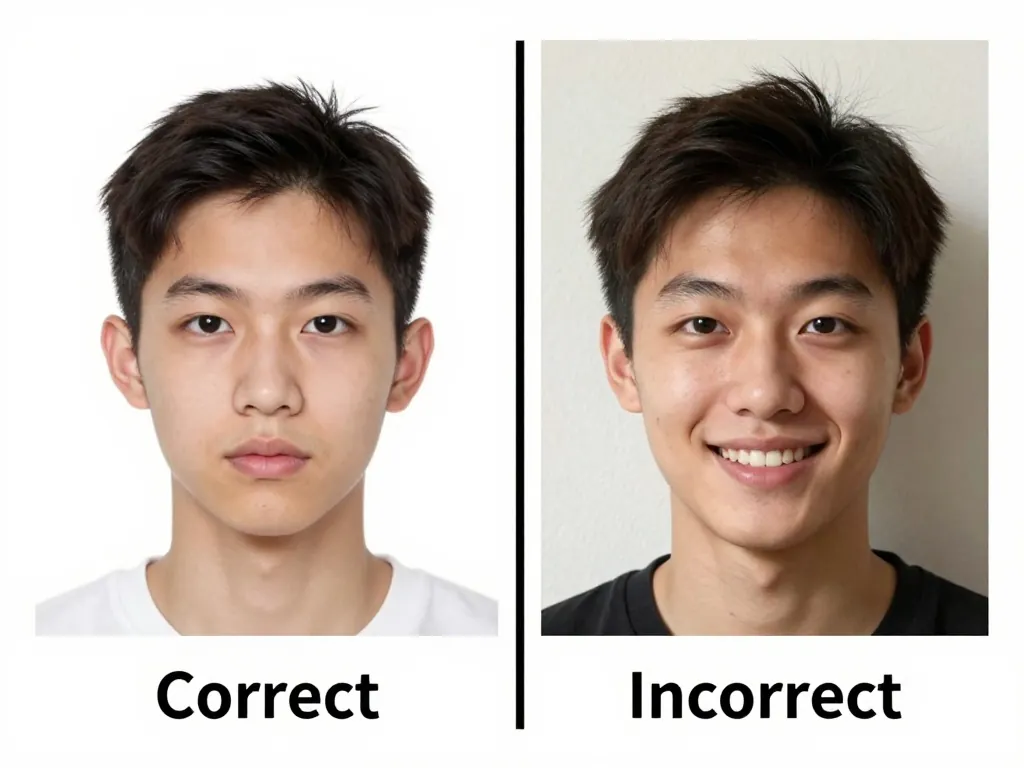
A digital passport photo is a passport-compliant image stored as a file rather than printed on paper. More and more governments accept them for online visa, passport, and ID applications, so knowing how to produce a correct one matters. Whether you’re renewing a passport from your kitchen table or submitting a visa application at midnight, a good digital file is now the starting point.
What the file has to satisfy
A digital passport photo isn’t just any selfie. To be accepted, it must:
- Match the exact dimensions your country requires (for example, 2×2 inches for a US passport or 35×45 mm across much of Europe)
- Show a plain, light-colored background with no shadows or objects behind you
- Capture a neutral expression, both eyes open, and a centered, front-facing head
- Meet minimum resolution and DPI rules (often 300 DPI or a set pixel size)
Switching to a file changes how you submit, not what you have to submit. Every rule on paper still applies.
What changed on the government’s side
Paper applications are giving way to fully online submission portals. A digital passport photo lets you apply from home, upload it directly, and avoid print shops entirely. It also saves money and reduces the chance of a rejected physical print arriving damaged in the mail.
For travelers this removes the worst part of a submission: no hunting for a photo booth in an unfamiliar city. Fix a photo on your phone and move on with your plans. Families with small children get the most out of it, because there is no dragging a fussy toddler to a studio and hoping for a lucky shot.
How to create a digital passport photo online
You don’t need special software or a design background. The free digital passport photo tool runs entirely in your browser:
- Pick your country and document type to get the exact size (see US, UK, or India for examples)
- Upload a normal photo taken with your phone in decent light
- Let it auto-crop, fix the background, and position your face to spec
- Download the finished digital passport photo at the DPI your application needs
Because processing happens on your device, your photo is never uploaded to a server, which keeps it private. When you make a digital passport photo online this way, you skip the guesswork of resizing and the risk of a non-compliant submission.
Getting a clean source photo
Start with a strong source photo. Stand near a window with soft, even light, and use a blank wall behind you. Keep your shoulders square, eyes open, and mouth relaxed. Avoid heavy filters or beauty edits; they can change your appearance enough to be rejected.
If you wear glasses daily, take one shot with and one without them, then use whichever looks clearest without glare. Religious headwear is allowed where required, but your full face must stay visible from the bottom of the chin to the top of the forehead.
Common mistakes to avoid
- Using a busy or colored background when a plain one is required
- Wearing glasses with glare or a hat that isn’t religiously required
- Cropping too tight so the head height falls outside the allowed range
- Submitting a low-resolution file that fails an application’s minimum pixel check
- Forgetting to check the exact size for your specific document type
Each country tunes its rules slightly, so always confirm the dimensions before you submit. A Canadian passport photo and an Australian passport photo may look similar but follow different specs.
Portal specs, side by side
These are the numbers portals actually validate: size in millimeters or inches, the pixel equivalent at 300 DPI, and the file-weight limit where one is published:
| Country / document | Official size | Pixels at 300 DPI | File limit (where set) |
|---|---|---|---|
| USA passport / DS-160 visa | 2 × 2 in (51 × 51 mm) | 600 × 600 px | JPEG ≤ 240 KB (DS-160, DV Lottery) |
| UK / EU / India passport | 35 × 45 mm | 413 × 531 px | Portal-specific; typically under 1 MB |
| Canada passport | 50 × 70 mm | 590 × 827 px | Online portal guidance applies |
| Bangladesh passport | 45 × 55 mm | 531 × 650 px | As stated by the issuing portal |
| China passport | 33 × 48 mm | 390 × 567 px | As stated by the issuing portal |
Always re-check the official page for your issuing authority before uploading, since portals occasionally change limits without notice.
Whether you also need a print
The image itself is identical: same size, same background, same expression rules. Only delivery changes.
- Digital submission. Upload the file directly; no print shop, no shipping, usually faster processing.
- With a printed submission, the same file is printed at 300 DPI on photo paper, and cutting accuracy and paper quality become your new failure points.
- Both. Some applications (for example certain visa centers) ask for a digital upload plus printed copies of the same photo, so one compliant file covers both.
Produce one correctly spec’d master file and every downstream format derives from it without re-shooting: a portal upload, a 4 × 6 print sheet, or a KB-limited upload.
Producing one with an online tool
Take a clear photo in good light, open the online passport photo maker, and download a compliant digital passport photo ready to upload. It’s free, private, and works for passports, visas, and ID cards worldwide. No appointments, no booths, no wasted prints, just a file you can trust.
Frequently Asked Questions
What is a digital passport photo?
A digital passport photo is a passport-compliant image saved as a digital file instead of a printed photo. It follows the same official size, background, and expression rules but is submitted or stored electronically for online applications.
Can I use a digital passport photo for my application?
Many countries now accept digital passport photos for online visa, passport, and ID applications. Check your issuing authority's requirements, since some still ask for physical prints or printed codes alongside the digital file.
How do I make a digital passport photo online?
Take a clear photo in good light, upload it to a free tool like the one at PictoPassport, and let it auto-crop to your country's exact size, fix the background, and position your face. Then download the finished file at the DPI your application needs.
What size should a digital passport photo be?
It depends on the country and document type. A US passport photo is 2×2 inches, while most of Europe uses 35×45 mm. Always confirm the exact dimensions for your specific application before submitting.
Is my photo kept private when I create it online?
With browser-based tools such as PictoPassport, the photo is processed entirely on your device and is never uploaded to a server. That keeps your image private and avoids the risks of sending personal photos to third-party websites.
What file format should a digital passport photo use?
JPEG is the default for nearly every government portal. DS-160, the DV Lottery and most passport systems all ask for it. Use PNG only when a form explicitly requires lossless quality, and check the stated maximum file size before uploading.
Can I resubmit the same digital photo for a future application?
Only if it is still recent. Most authorities require a photo taken within the last 6 months, and some, such as the UK, require one month. Infants and young children should always be re-photographed, since faces change quickly.